The smarter way to track business expenses

Track Every Dollar,
Effortlessly

Snap receipts, track mileage, auto-categorize with AI, and generate tax-ready reports. Built for freelancers, contractors, and small businesses who need clarity on spending.

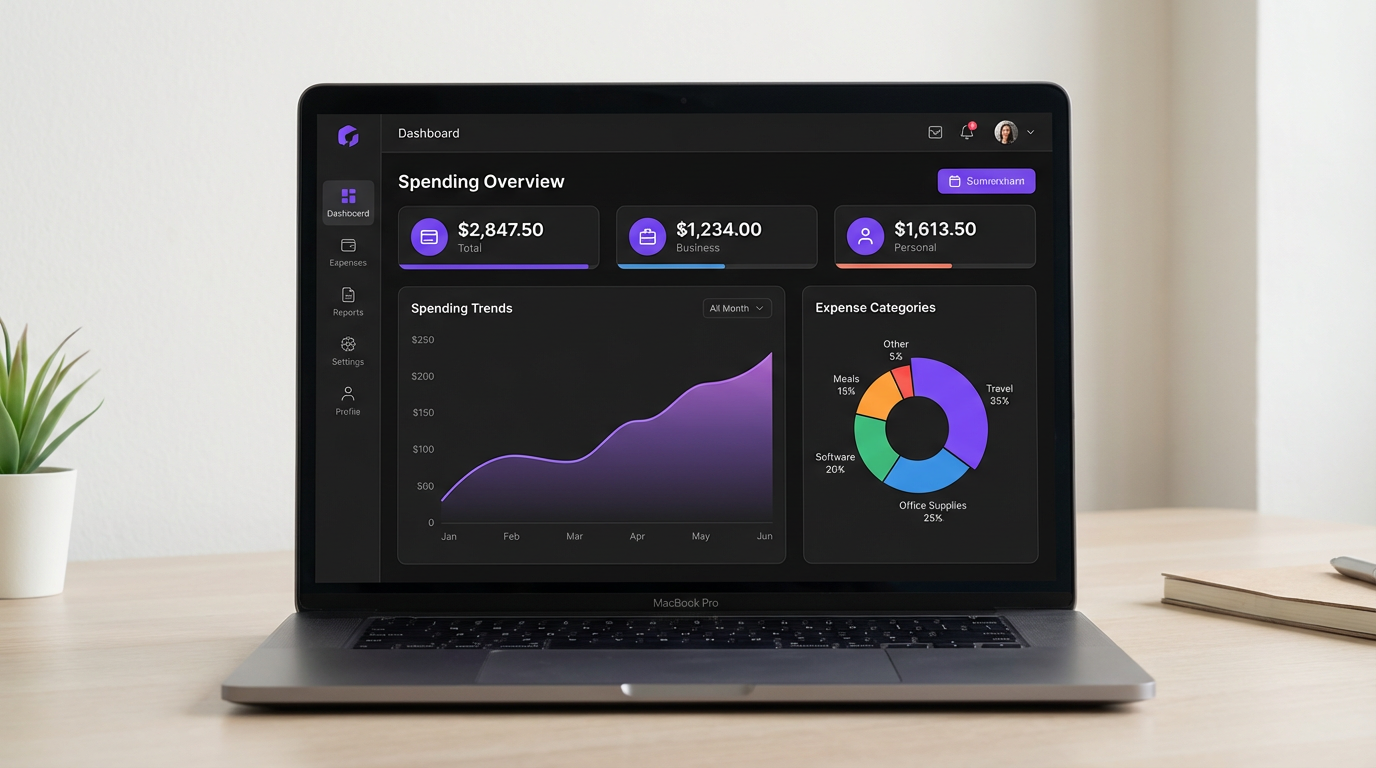
SimplyExpensed dashboard showing expense analytics with spending trends, category breakdowns, and monthly totals
<10s
To add an expense
28+
GAAP categories built in
5
Export formats
$0
To get started

Everything You Need to Stay Organized

Powerful tools that simplify expense management from receipt to report.

Snap & Track

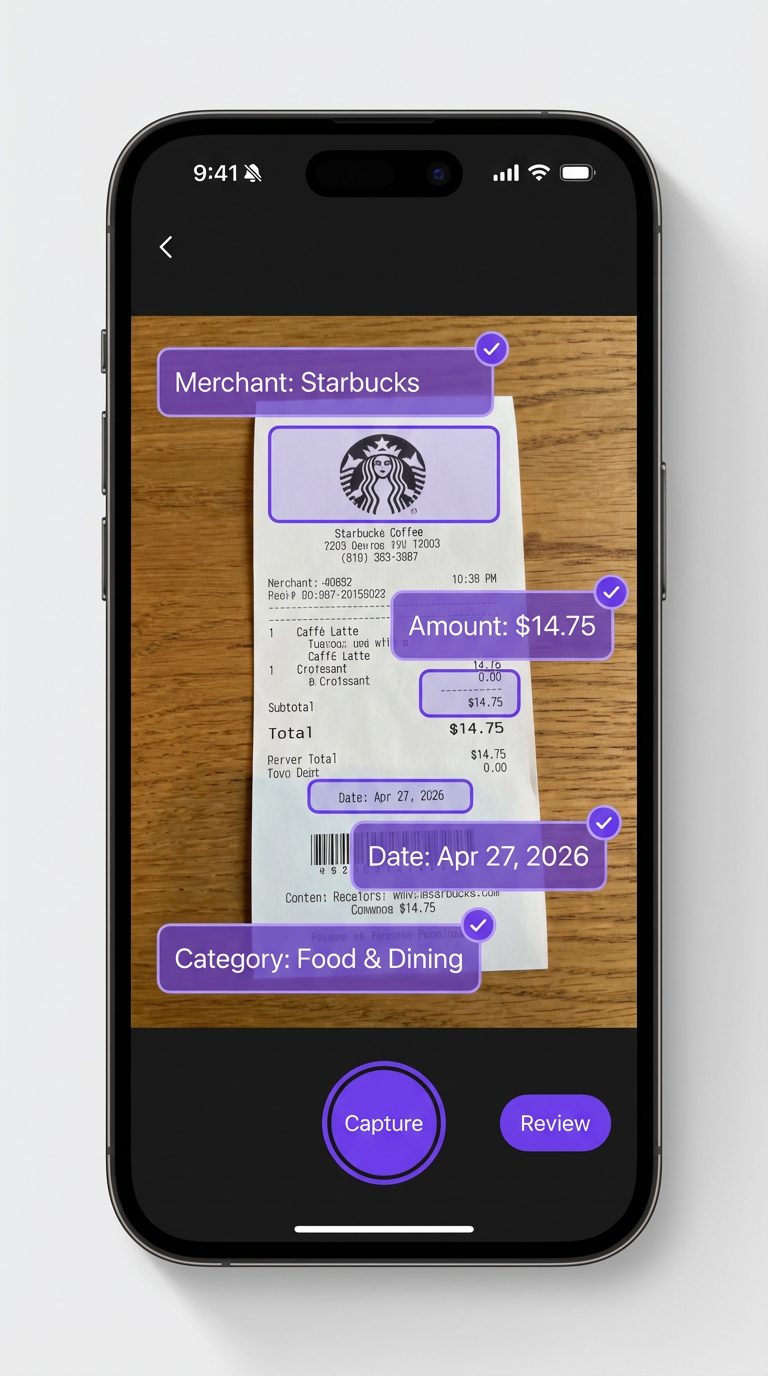
Capture receipts instantly with your phone camera. AI extracts merchant, date, and amount automatically.

AI Categorization

Smart AI automatically maps expenses to IRS-compliant GAAP categories for easy tax reporting.

Mileage Tracking

Log trips with start/end odometer readings. Auto-calculates miles and IRS deductions at current rates.

Visual Reports

Interactive charts, category breakdowns, and merchant summaries help you spot spending patterns.

Schedule C Ready

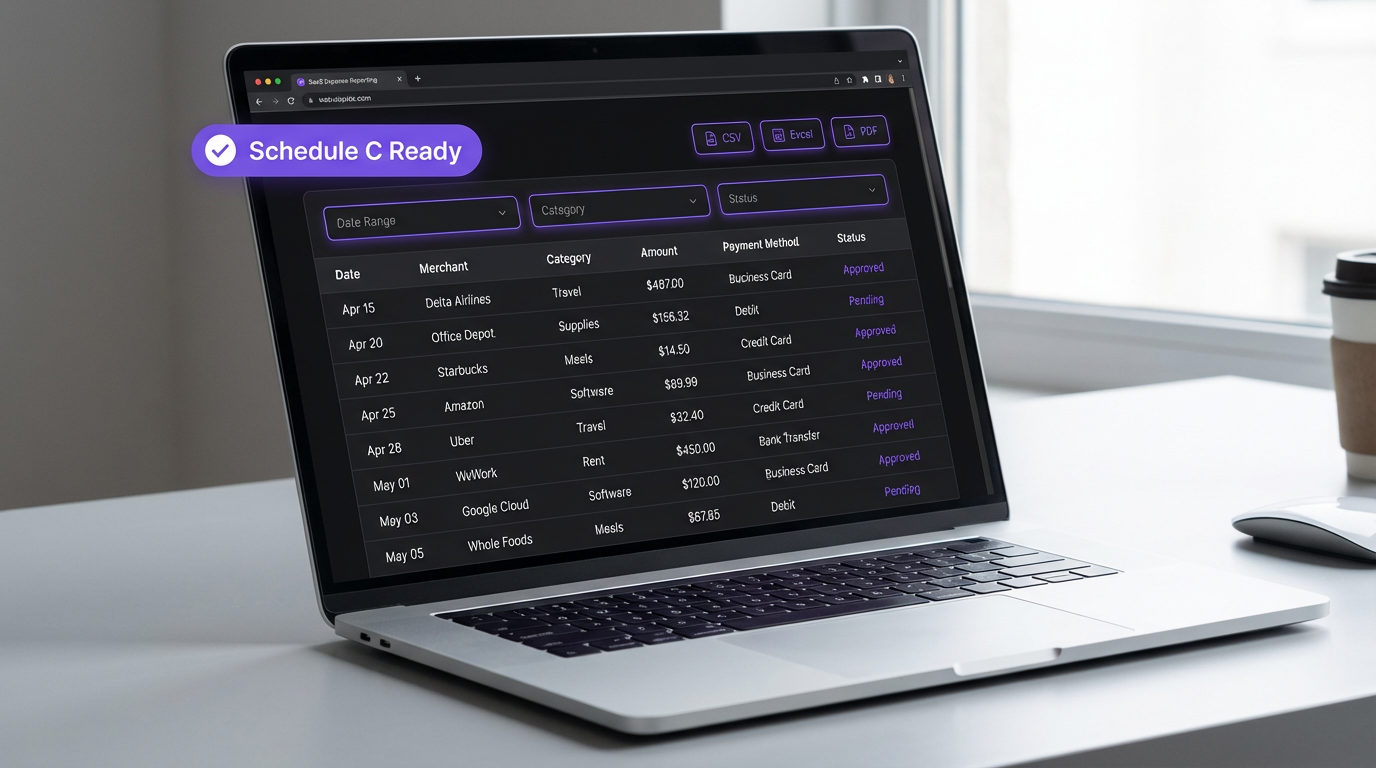
Export expenses mapped directly to IRS Schedule C line items. Tax season made painless.

Bank-Level Security

Your data is encrypted at rest and in transit. Private cloud storage for all receipt images.

How It Works

From receipt to report in four simple steps.

01

Snap Your Receipt

Take a photo or upload an image of any receipt.

02

AI Does the Work

OCR extracts all details and suggests the right category.

03

Review & Approve

Confirm the data, make edits, and save in one tap.

04

Export Anywhere

Generate PDF reports, CSV, Excel, or Schedule C exports.

Live Demos

Watch It In Action

Real footage from the app — no mockups, no scripted clicks. See exactly what you get.

AI Receipt Scanning

Snap a receipt → AI extracts everything → Pick a category → Done

GPS Trip Tracking

Start trip → Drive (8× speed) → Auto-calculate distance & IRS deduction

Manual Mileage Entry

Enter odometer readings → Auto-calculate miles & IRS deduction → Saved

See It in Action

From snapping a receipt on your phone to generating tax-ready reports — it all just works.

Smart Receipt Capture

Point. Snap. Done.

Our AI reads your receipts in seconds — extracting the merchant, amount, date, and even suggesting the right GAAP category. No more manual data entry or lost paper receipts.

  • Works with photos, scans & PDFs
  • Supports multiple currencies
  • Auto-suggests IRS categories
SimplyExpensed mobile receipt scanning with AI field extraction showing merchant, amount, and category detection
SimplyExpensed reports page with expense data table, filters, and CSV/Excel/PDF export options
Tax-Ready Reports

Reports Your Accountant Will Love

Pick exactly the columns you need, filter by date or category, and export in one click. Every expense maps directly to IRS Schedule C line items.

  • Export as CSV, Excel, or PDF
  • Customizable column picker
  • IRS Schedule C category mapping
IRS Mileage Tracking

Every Mile Counts at Tax Time

Log business, medical, and charity trips with odometer readings. SimplyExpensed auto-calculates your deductible miles using the latest 2026 IRS standard rates — so you never leave money on the table.

  • 2026 IRS rates: Business $0.725/mi, Medical $0.205/mi, Charity $0.14/mi
  • Round trip toggle doubles your miles automatically
  • Separate mileage reports with CSV export for tax filing
  • Available on all plans — even Essential
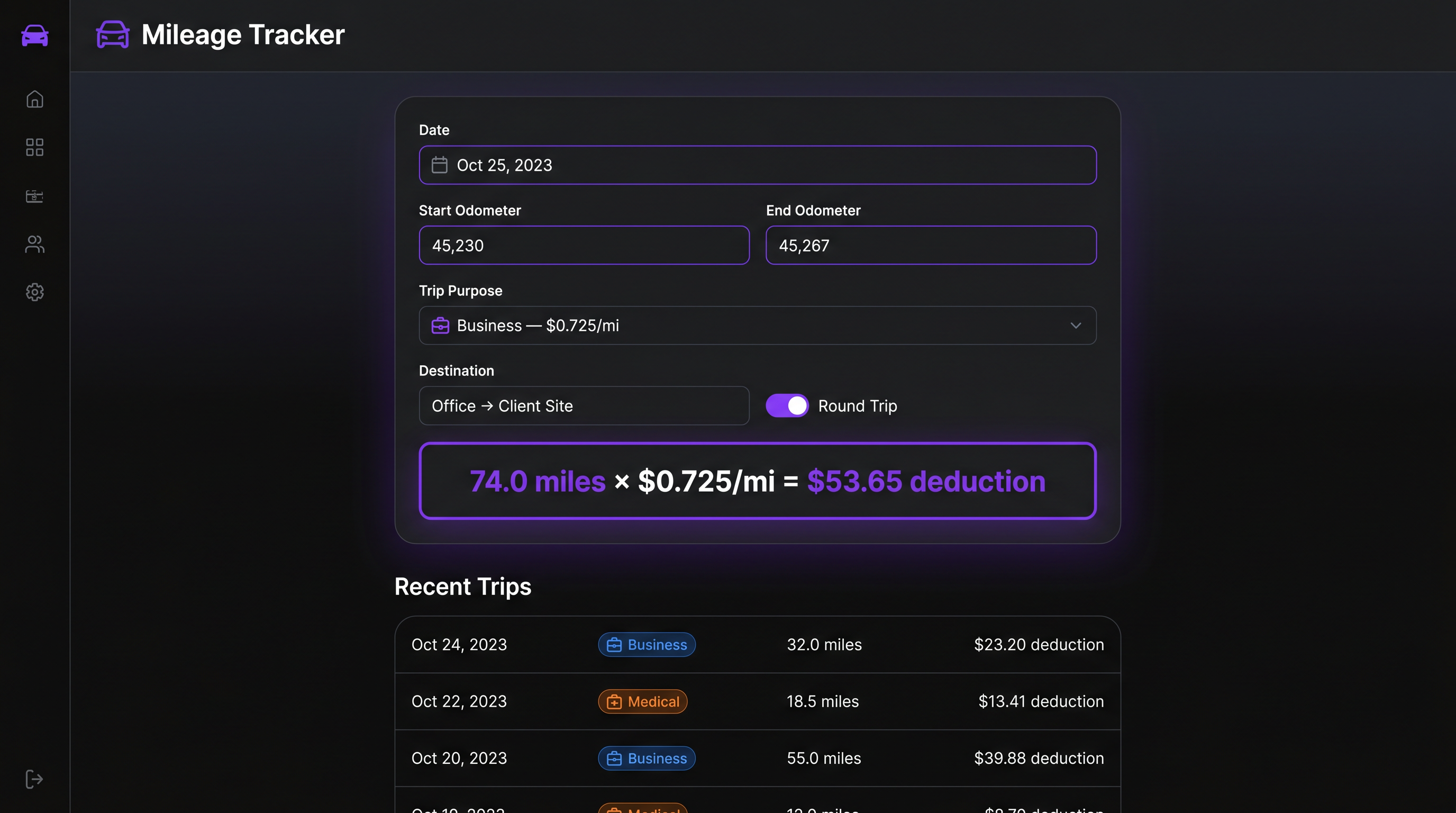
SimplyExpensed mileage tracker showing trip logging with odometer readings, IRS deduction calculation, and trip history

Simple, Transparent Pricing

Start free and upgrade as you grow. No hidden fees, cancel anytime.

MonthlyYearly Save ~30%

Essential

$0
  • Up to 10 receipt scans/month
  • Manual category selection
  • GAAP standard categories
  • CSV export
  • Basic expense reports
  • Secure cloud storage
Most Popular

Pro

$6.99/mo
  • Unlimited receipt scans
  • AI auto-categorization
  • GAAP + Custom categories
  • CSV, Excel & PDF export
  • Advanced expense reports
  • Bulk receipt upload (up to 10)
  • Bulk vendor upload
  • Priority support

Business

$12.99/mo
  • Everything in Pro
  • PDF & Google Sheets export
  • Tax report formatting
  • Chart of Accounts upload
  • Bulk receipt upload (up to 50)
  • Bulk vendor upload
  • Team accounts & approvals
  • Volume discounts (5+ users)

Business Volume Discounts (Monthly): Users 1–5 $12.99 • Users 6–25 $9.99 • Users 26–50 $6.99 • Users 51+ $3.99

Business Volume Discounts (Annual): Users 1–5 $119.99 • Users 6–25 $92.29 • Users 26–50 $64.59 • Users 51+ $36.89

Frequently Asked Questions

Everything you need to know about expense tracking and mileage logging

What is SimplyExpensed?+
SimplyExpensed is an AI-powered expense tracker and GPS mileage logger built for freelancers, contractors, gig workers, and small businesses. It features receipt scanning with OCR, GAAP-compliant auto-categorization, IRS Schedule C export, and real-time GPS mileage tracking with route visualization.
How does GPS mileage tracking work?+
Tap "Start Trip" before you drive. SimplyExpensed records GPS waypoints every 15 seconds as you travel, creating a breadcrumb trail of your actual route. When you tap "End Trip," it calculates the exact driving distance — even on loop routes — reverse-geocodes your start and end addresses, and auto-calculates your IRS deduction at the 2026 rate of 72.5¢ per business mile. You can view the route on an interactive map after the trip.
What is the 2026 IRS standard mileage rate?+
The 2026 IRS standard mileage rates are: 72.5 cents per mile for business use, 20.5 cents per mile for medical or moving purposes, and 14 cents per mile for charitable purposes. SimplyExpensed automatically applies the correct rate based on your trip purpose.
Is SimplyExpensed free to start?+
Yes. The Essential plan includes unlimited manual expense entries, GPS mileage tracking, 5 AI receipt scans per month, basic reports, and CSV export — all at $0 with no credit card required. The Pro plan ($8/month) adds unlimited AI scans, Excel/PDF exports, IRS Schedule C export, and team features.
Can SimplyExpensed generate IRS Schedule C reports?+
Yes. SimplyExpensed categorizes your expenses using GAAP-compliant categories that map directly to IRS Schedule C line items. Export a Schedule C-ready report with one click — organized by category with totals matching each line. This makes tax filing significantly easier for self-employed individuals.
How does AI receipt scanning work?+
Snap a photo of your receipt or upload an image. SimplyExpensed uses AI-powered OCR to automatically extract the merchant name, date, total, tax, subtotal, and individual line items. It then auto-categorizes the expense into the correct GAAP category in about 2 seconds.
Who is SimplyExpensed designed for?+
Self-employed individuals, freelancers, independent contractors, gig workers (Uber, DoorDash, Instacart), lawn care and landscaping businesses, real estate agents, sales professionals, delivery drivers, consultants, and any small business owner who needs to track expenses and mileage for tax purposes.
Does it work for lawn care and landscaping businesses?+
Absolutely. Lawn care operators drive between multiple job sites daily, and the GPS mileage tracker captures every mile — even on loop routes where you start and end at the same place. At 72.5¢/mile (2026 rate), driving 30 miles a day for 20 weeks of summer equals $2,175 in deductions from driving alone. Add equipment, fuel, and supply receipts and the savings multiply.
What makes SimplyExpensed different from MileIQ or Everlance?+
SimplyExpensed combines expense tracking AND mileage tracking in one app with a generous Essential plan at $0. Unlike MileIQ (mileage only, $5.99/mo) or Everlance ($8/mo for basic), SimplyExpensed includes AI receipt scanning, GAAP categorization, Schedule C export, and GPS mileage tracking — all starting at $0. The GPS tracker uses waypoint breadcrumbs for accuracy on any route shape, including loops.
Is my financial data secure?+
Yes. SimplyExpensed uses bank-level encryption (TLS 1.3), secure cloud storage for receipts, role-based access controls, IP-based security monitoring, brute force detection, and a comprehensive audit trail system. All data is backed up and protected with enterprise-grade security infrastructure.
Free Download · No credit card

The Freelancer’s 2026 Tax Deduction Checklist

Every Schedule C deduction the IRS lets you claim — with the new 2026 mileage rates and cited IRS sources. Built for solopreneurs, contractors, and side hustlers.

  • 14 categories of deductible business expenses
  • Brand-new 2026 IRS mileage rates (72.5¢ business, 20.5¢ medical)
  • Section 179 & bonus depreciation rules for 2025/2026
  • IRS record-keeping requirements that survive an audit
  • 9 cited authoritative IRS sources (no fluff)

We’ll email you the PDF and occasional tax-saving tips. Unsubscribe anytime.

No App Store Required

Get SimplyExpensed on Your Phone

Install SimplyExpensed directly to your home screen — works just like a native app. Snap receipts, track mileage, and manage expenses on the go.

1

Visit simplyexpensed.com on your phone

Open Safari (iPhone) or Chrome (Android)

2

Tap “Install” or “Add to Home Screen”

You’ll see a prompt after signing in, or use your browser’s share menu

3

Launch from your home screen

Full-screen app experience — no browser bars

Works on

iPhone • Android • Desktop

Ready to Simplify Your Expenses?

Built for professionals who want clarity on every dollar they spend. Start free — no credit card required.